

Summary
Master email etiquette with 25 rules and examples for March 2026. Learn subject lines, formatting, response times, and professional communication standards.
You send out application after application and still hear nothing back. In crowded inboxes, small mistakes in email etiquette decide whether your message gets opened or ignored. Subject lines that feel vague, greetings that sound awkward, or follow-ups that come across as pushy can quietly work against you even when your qualifications are strong. The good news is that writing emails hiring managers actually read is a skill you can learn, and modern tools can help generate tailored cover letters and job application emails while you focus on the roles that matter. Here are the email etiquette rules that help your messages stand out and get responses.
TLDR:
Proper email etiquette drives results: 81% of professionals expect replies within one business day.
Subject lines under 50 characters, clear structure under 150 words, and PDF attachments help avoid formatting issues that could hurt your application.
Job seekers face unique challenges applying to 100+ roles while maintaining personalized, error-free emails.
Hiring managers often decide whether to read or ignore an email based on the subject line and first sentence alone.
Some modern solutions generate tailored cover letters and ATS-friendly applications for each role you apply to.
What Email Etiquette Is and Why It Matters in March 2026
Do's ✓ | Don'ts ✗ |
|---|---|
Use specific subject lines under 50 characters | Use vague subjects like "Quick question" or "Urgent" |
Reply to recruiters within 24 hours | Wait more than 2 business days to respond |
Proofread twice before sending | Rely solely on autocorrect |
Use "Dear [Name]" for first contact | Start with "Hey" or "Hi there" in formal emails |
Keep emails under 150 words | Write long paragraphs or dense text blocks |
Name files professionally (Jane_Smith_Resume.pdf) | Use generic names like "resume_final_v3.docx" |
Use Reply All only when everyone needs your input | Reply All to acknowledge receipt or say "thanks" |
Send attachments as PDFs for compatibility | Send Word documents that may break formatting |
Email etiquette is the set of written and unwritten rules that govern professional, respectful, and effective email communication. Think of it as the workplace code that determines how you present yourself through every message you send.
In 2026, mastering these rules matters more than ever. The average person manages 1.86 email accounts and receives between 82 and 120 emails daily. For office workers in particular, that number jumps to 121 emails per day, consuming 28% of their entire workday.
When your message competes with 100+ others in someone's inbox, proper etiquette becomes the difference between getting read or getting deleted. In job searching, the stakes are even higher. A poorly crafted email to a hiring manager can end your candidacy before it starts, while a well-written message opens doors to interviews and opportunities.
Subject Lines: Your First Impression
Your subject line decides whether your email gets opened or ignored. The best subject lines stay specific and informative. "Application for Senior Marketing Manager - Jane Smith" beats "Job Application" every time. When networking, "Following up from Tech Conference - AI Discussion" works better than "Nice to meet you."
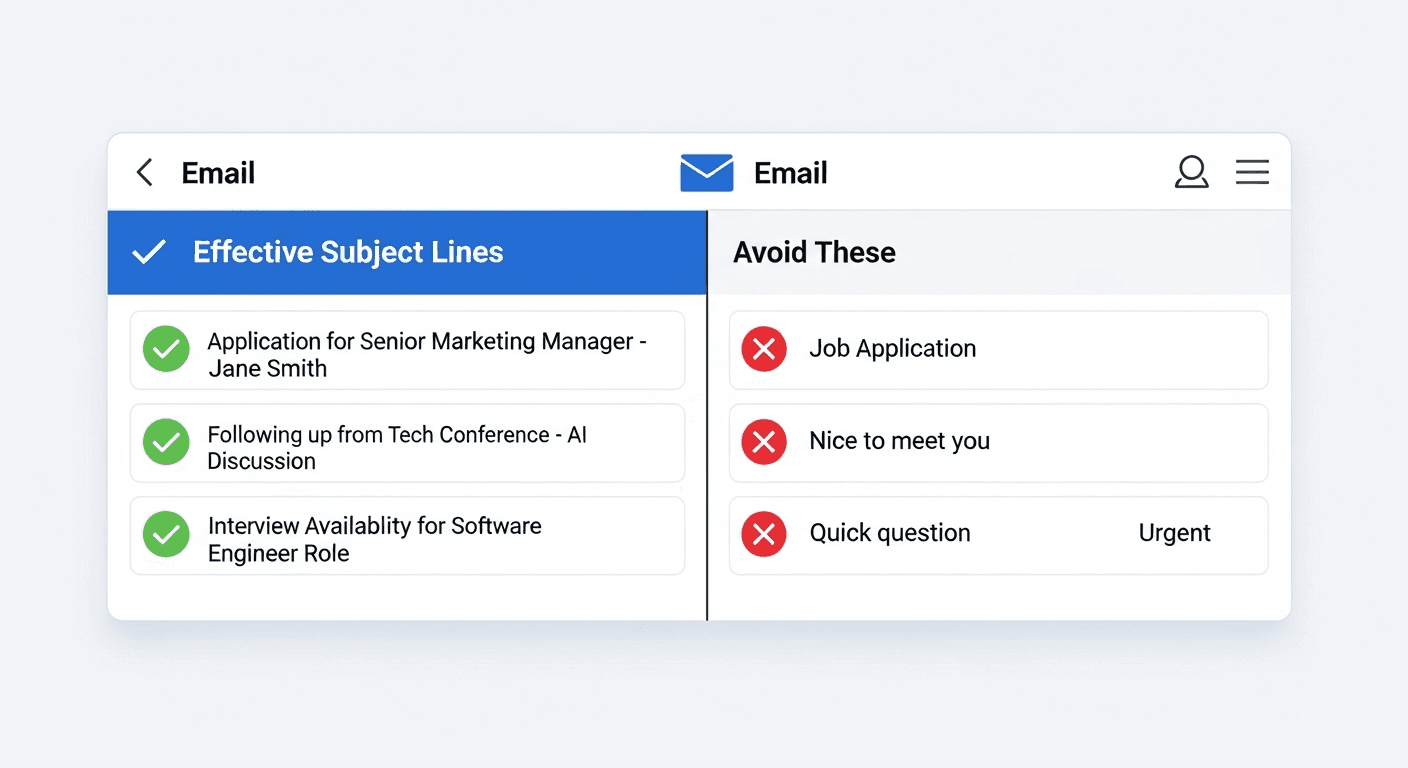
Keep subject lines under 50 characters when possible. Mobile devices truncate longer ones, cutting off your message before anyone reads it.
Skip clickbait phrases like "Quick question" or "Urgent." State your actual purpose: "Interview Availability for Software Engineer Role" or "Referral Request - Data Analyst Position."
Professional Greetings and Sign-Offs
How you start and end an email sets the tone for everything in between. Get this wrong, and you risk annoying the recipient before they read your message.
For formal situations like job applications or first-time outreach, use "Dear [First Name] [Last Name]" or "Dear Hiring Manager" if you don't have a name. "Hello [First Name]" works once you've made initial contact or when emailing peers.
Skip overly casual greetings like "Hey" or "Hi there" in professional settings. Save those for colleagues you know well.
Sign-offs matter just as much. "Sincerely" and "Best regards" work for formal emails. "Best" or "Thanks" fit everyday work correspondence. Include your full name on first contact, then switch to just your first name in ongoing threads.
Email Structure and Formatting for Clarity
Break your emails into digestible chunks. Start with your main point in the opening sentence, then provide supporting details. Single-sentence paragraphs work fine for emails. Aim for 2-3 sentences max per paragraph.
Use bullet points when listing multiple items or action steps. They make information scannable and easier to process than dense text blocks. White space between paragraphs gives readers visual breathing room.
Keep professional emails under 150 words total. Recipients scan, not read. Put your ask or next step in the final paragraph so it's clear what you need. "Could we schedule a 15-minute call this week?" beats burying your request mid-email where it gets missed.
Tone and Professionalism in Written Communication
Tone trips up even experienced professionals. Without facial expressions or voice inflection, your words carry the full weight of meaning. A sentence you intend as direct can read as blunt. A friendly message might seem unprofessional.
Common mistakes include over-explaining (which reads as defensive), using too many exclamation points (looks overeager), or writing in all caps (screams aggression). Sarcasm never translates in text. What sounds witty in your head can land flat or rude on screen.
Read your email aloud before sending. If it sounds off-putting spoken, it'll read worse. Match your tone to your audience. Emailing a startup founder? Conversational works. Writing to an executive at a Fortune 500 company? Lean formal.
The Art of CC, BCC, and Reply All
Misusing CC, BCC, and Reply All creates chaos and can damage your professional reputation.
Use To for primary recipients who need to act. CC anyone who should stay informed but doesn't need to respond. BCC protects privacy when emailing multiple recruiters or contacts who don't know each other. Reply All only when every person on the thread truly needs your response.
Response Time Expectations and Follow-Up Etiquette
Timing your responses shows respect and interest. 81% of professionals expect replies within one business day, with 21% wanting answers within four hours.
Reply to recruiter emails within 24 hours, even if only acknowledging receipt. Hiring managers notice quick responses, which signal genuine interest in the role.
Wait one week after submitting an application before following up. For interview requests, two weeks is reasonable. Keep check-ins short: "I wanted to check on my application for [role]. I remain interested and happy to provide additional information."
Stop after two follow-ups. More reads as desperate.
Use out-of-office replies when unavailable for 24+ hours. Job seekers should skip these during active searches since delays can lose opportunities.
Proofreading and Grammar: Non-Negotiable Standards
Typos and grammar errors destroy your credibility. 93% of people have made email mistakes, and 48% judge typos in work emails more harshly than on other channels.
Common mistakes include wrong names from copy-pasting, subject-verb disagreement, and mixing up "your/you're" or "their/there/they're." Autocorrect changes words to something grammatically correct but contextually wrong.
Read every email twice before sending. First for content and clarity, second for typos. Reading backward catches errors your brain skips.
Attachments and File Management Best Practices
Name your files professionally before attaching. "Jane_Smith_Resume.pdf" and "Jane_Smith_Cover_Letter.pdf" work better than "resume_final_FINAL_v3.docx." Hiring managers download dozens of applications daily, and generic names get lost or overwritten. Before sending, make sure you've also taken time to tailor your resume to job descriptions so the content matches what they're looking for.
Always use PDF format for resumes and cover letters. Word documents can display differently across systems, and while many ATS platforms support both formats, PDFs help preserve consistent formatting.
Keep attachments under 5MB. Most email systems reject larger files. Reference attachments in your email: "I've attached my resume and cover letter for the Marketing Manager position."
Write your email, attach files first, then add the recipient email last to avoid sending incomplete messages.
Email Etiquette for Job Applications and Networking
Job search emails require extra precision. You're communicating while representing your professional value and building relationships that could shape your career. Learning how to email hiring managers correctly increases your chances of getting responses and moving forward in the hiring process.
When reaching out to recruiters or hiring managers, personalize every message. Reference something specific about the company or role that connects to your background. Generic templates get deleted immediately. If you're attaching your resume, knowing what to write in an email when sending a resume can make the difference between getting read or ignored.
For networking requests, lead with value. "I noticed your work on [specific project]" beats "I'd love to pick your brain." Make asks small and specific: "Would you have 15 minutes for a brief call?" works better than vague "coffee sometime" requests.
Job seekers who only reach out when they need something damage their network. Share relevant articles, congratulate connections on promotions, and stay visible between asks.
How AI and Automation Are Changing Email Communication
AI tools now handle much of the heavy lifting in email communication. In 2026, job seekers use AI to draft tailored cover letters, personalize outreach messages, and manage application correspondence at scale. The tech saves time while maintaining the personalization that recruiters expect.
The challenge is authenticity. Hiring managers can spot generic AI-generated content, and robotic-sounding emails get ignored. The solution isn't avoiding AI, but using it smartly. Tools that pull specific details from job descriptions and personalize each message based on your actual experience create emails that read as human-written. The best approach combines AI speed with your authentic voice, letting you apply to more roles without sacrificing quality or sounding like a bot.
Simplify Your Job Search Email Communication with Sprout
Applying to multiple jobs every week multiplies the importance of proper email etiquette. Each application requires tailored cover letters, professional formatting, and personalized messaging. Doing this manually becomes difficult without cutting corners.
We built Sprout to solve this. The AI generates professional cover letters for every application that follow the standards covered in this guide. Each one includes proper greetings, clear structure, appropriate tone, and error-free writing.
Sprout's ATS-friendly formatting uses clean layouts, standard headers, and proper structure that both ATS systems and human readers can parse. The Sprout AI job search unified dashboard tracks every application, making follow-up timing simple. You know exactly when to send check-in emails without second-guessing.
FAQs
How quickly should I respond to a recruiter's email?
Reply within 24 hours, even if you're just acknowledging receipt and need time to provide a full answer. Quick responses signal genuine interest in the role and respect for the recruiter's timeline.
When is it appropriate to follow up after submitting a job application?
Wait one week after submitting an application before sending your first follow-up. If you don't hear back, you can send one more check-in after two weeks. Stop after two follow-ups to avoid appearing desperate.
What's the biggest email mistake that hurts job seekers?
Typos and grammar errors destroy credibility instantly: 48% of people judge typos in work emails more harshly than on other channels. Always proofread twice: once for content and clarity, once for spelling and grammar mistakes.
Final Thoughts on Communicating Through Email
Strong email etiquette turns ordinary job application emails into messages that hiring managers actually read and respond to. Clear subject lines, concise structure, timely replies, and clean attachments all shape how recruiters view your professionalism before an interview even happens. When you apply to dozens or even hundreds of roles, keeping that level of consistency becomes difficult without help. Tools like Sprout make it easier by generating tailored cover letters and application emails that follow proven email etiquette standards while keeping each message aligned with the role you’re applying for. The result is a job search that feels more organized, more polished, and far more likely to get replies.